
Skill Installation & Sharing
Skill installation, configuration, and sharing are core extensibility capabilities of SingWork. Users can install, manage dependencies, initialize configurations, share, and install via links for various functional plugins (Skills) using natural language commands—no manual command-line operations or configuration file editing required, enabling zero-barrier platform extension and secure collaboration.
Core Functionality Flow & Experience
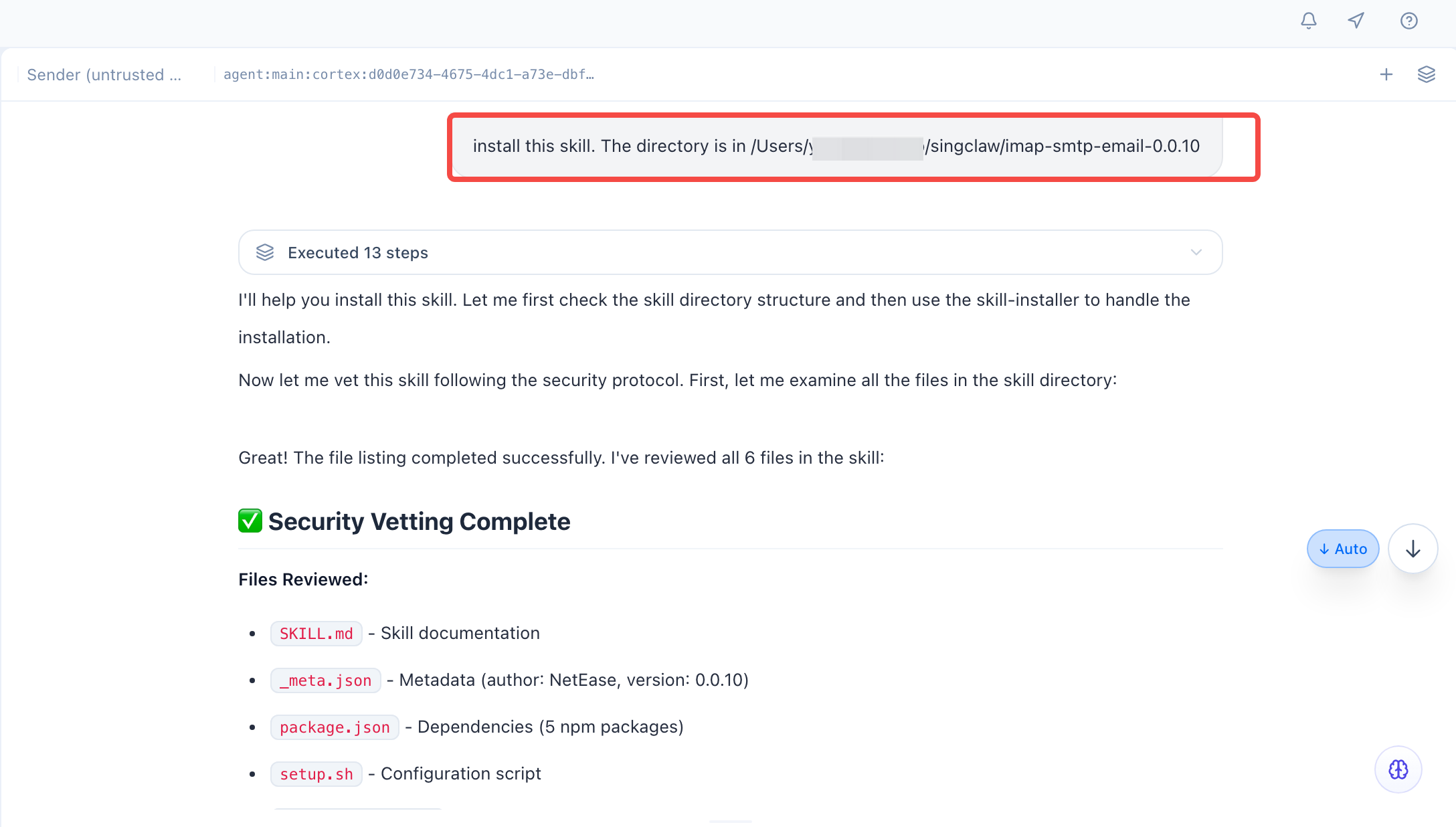
The complete workflow can be clearly seen using the imap-smtp-email email plugin installation scenario as an example:
- Natural Language Triggered Installation – Users only need to enter a command in the conversation (e.g., “Help me install this skill, the directory is at xxx”) to start the installation process, without memorizing complex commands or steps.
- Automated End-to-End Execution – The system automatically handles downloading, dependency installation, configuration initialization, and more in the background, with real‑time progress feedback (e.g., “16 operations executed”), requiring no user intervention.
- Visual Installation Result Feedback – After installation, the system outputs a structured status report showing installation path, version, dependencies, configuration files, and other key details for full transparency.
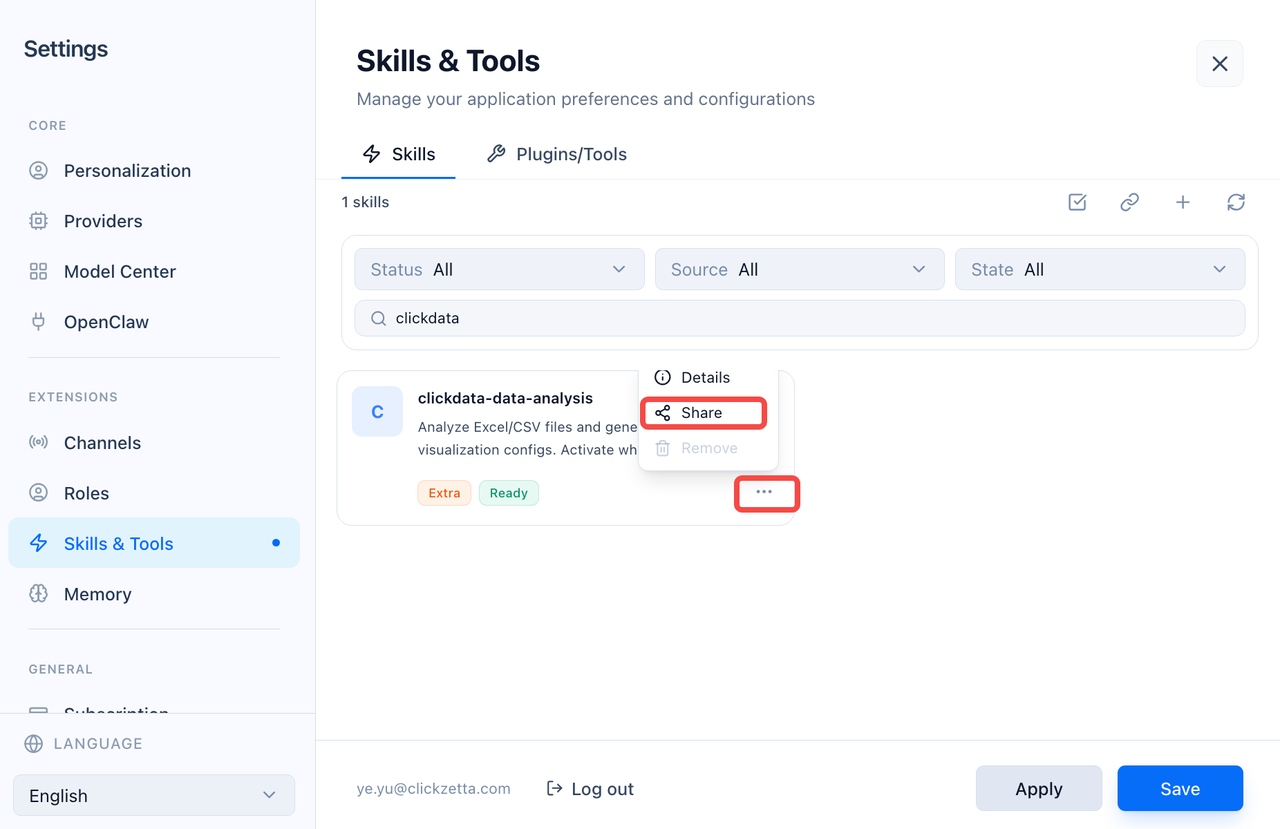
- One‑Click Skill Sharing & Link Installation – Users can generate shareable links; others paste the link to install the Skill with one click.
Core Capability Modules
1. One‑Click Automated Skill Installation
- Command‑Driven Installation – Users can specify a Skill name or directory via natural language; the system automatically fetches and installs the plugin without manual commands or source configuration.
- Automatic Dependency Management – Automatically detects and installs required packages (e.g.,
node_modules), resolving missing dependencies and version conflicts to ensure stable execution. - Standardized Directory Management – All Skills are installed into a standardized platform directory (e.g.,
~/.singwork/workspace/skills/), with automatic structure maintenance to avoid clutter.
2. Intelligent Configuration Initialization & Status Management
- Auto‑Generated Configuration Files – Automatically creates and initializes config files based on plugin type (e.g.,
.env), eliminating manual template writing. - Visual Configuration Display – Parses and shows key configuration details (e.g., email provider, account info) after installation for clear visibility.
- Installation Validation & Feedback – Validates success, dependency completeness, and configuration validity throughout the process, providing visual reports for fast issue location.
3. Skill Sharing & Link Installation
- Version Check – Ensure the client is updated to the latest version before sharing.
- Skill Sharing – Go to Settings → Skills/Tools, select a Skill, share it, and set visibility and expiration.
- Link Installation – Paste shared content on the Skills page, parse, and install with one click.
- Security & Control – Supports expiration and permission settings for secure sharing.
4. Plugin Extension & Scenario Adaptation
- Multi‑Type Skill Compatibility – Supports various plugins including email, data processing, office automation, and third‑party service connectors.
- Seamless Platform Integration – Installed Skills integrate directly with SingWork’s core capabilities and can be invoked in conversations without extra setup.
- Version & Lifecycle Management – Supports viewing version and installation path; users can upgrade, uninstall, or modify configurations via commands.
Typical Use Cases
- Office Automation – Install email, calendar, and document plugins to automate mailing, scheduling, and parsing.
- Third‑Party Service Integration – Use API connector plugins to link CRM, ERP, e‑commerce platforms, and more for data sync and workflow automation.
- Data Capability Enhancement – Add data processing and analytics plugins to support more formats and complex analysis.
- Personalization & Team Collaboration – Customize and share Skills quickly to improve team efficiency.
Core Value Summary
SingWork’s intelligent Skill installation, configuration, and sharing provide users with a zero‑barrier platform extension and collaboration center. It solves pain points of traditional plugin systems including complex installation, difficult dependency management, high configuration barriers, and lack of secure sharing. It enables fast capability expansion and secure collaboration, truly achieving install‑and‑use, out‑of‑the‑box, one‑click sharing.