
Scheduled Tasks & Execution
Scheduled task execution is SingWork's core capability for automated workflows. It allows users to configure data processing, report generation, message delivery, and other tasks to run automatically on a schedule through a visual interface — enabling unattended, periodic business process execution. It is the user's "automated workflow manager."
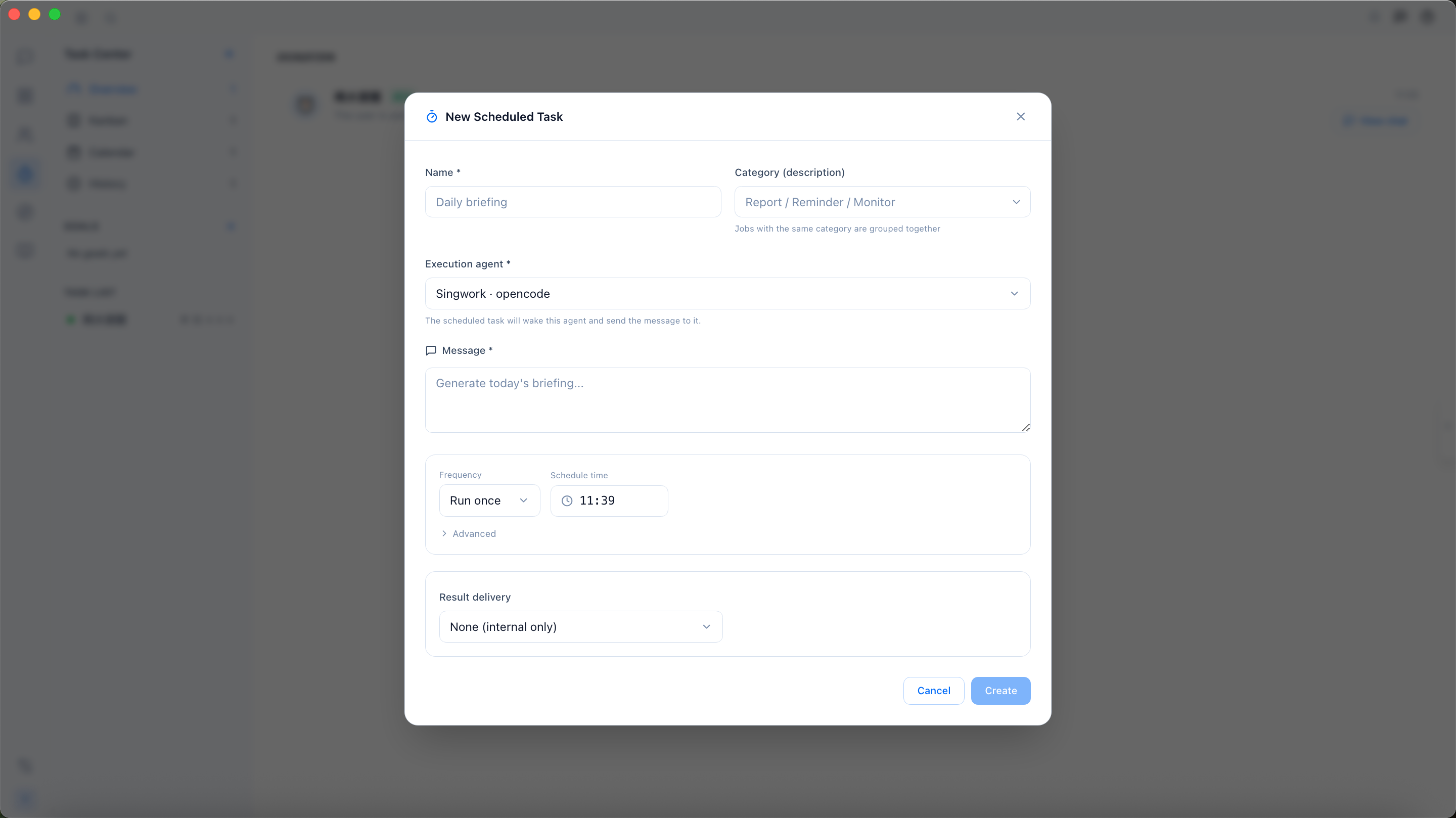
Core Functionality Flow & Experience
The "Daily Morning Report" scheduled task configuration example clearly shows the complete operation flow:
- Visual Task Creation — A "New Scheduled Task" visual form is provided. Users can complete task configuration without writing complex scheduling scripts.
- Task Configuration & Schedule Settings — Supports filling in task name, selecting category, setting schedule time and execution frequency. The system automatically generates the corresponding Cron expression (e.g.,
24 14 * * *in the example), lowering the barrier to scheduling configuration. - Task Execution & Result Delivery — Tasks run automatically at the scheduled time. After execution, results are pushed to the specified channel (e.g., "Publish Summary" delivery method in the example), and execution logs are recorded for traceability and troubleshooting.
Core Capability Modules
1. Flexible Task Scheduling Configuration
- Visual Schedule Settings: Supports daily/weekly/one-time execution modes. Users can directly select execution frequency and time; the system automatically parses it into a standard Cron expression — no manual writing required.
- Task Category Management: Supports categorizing tasks by type (e.g., reports/reminders/monitoring). Tasks of the same type are automatically grouped for easy batch management.
- Execution Logs & History Tracking: The left-side "Run History" module shows execution records for all scheduled tasks, including execution time, status, and result details, for quick status lookup.
2. Task Content & Automated Processing
- Command-Based Task Configuration: Users can fill in task instructions directly in the "Message Content" field (e.g., "generate today's morning report"), and the system will automatically execute the corresponding operations — supporting data processing, report generation, AI analysis, and more.
- Multi-Format File Processing: Supports dragging files and folders as task attachments. Excel/Word/CSV data files are automatically processed by the model, enabling automated periodic data tasks.
- Intelligent Task Execution: Powered by SingWork's AI capabilities, task instructions are automatically parsed and executed without additional script development, enabling complex periodic business processes.
3. Multi-Channel Result Delivery & Notifications
- Diverse Delivery Methods: Supports multiple result delivery modes such as "Publish Summary," pushing task execution results to specified channels.
- Multi-Platform Message Push: Supports configuring recipient information (e.g., phone number, chat ID). After task execution, results are automatically sent to designated personnel to ensure timely access.
- Delivery Status Feedback: Task execution and delivery status are recorded in real time. When "Delivery Failed" is shown (as in the example), the reason is clearly annotated for quick troubleshooting.
Typical Use Cases
- Periodic Data Reports: Configure daily/weekly data report generation tasks to automatically process data and generate reports, then push them to relevant personnel — replacing manual report creation.
- Business Monitoring & Alerts: Set up scheduled data monitoring tasks to automatically detect business metric anomalies and trigger alert notifications for unattended business monitoring.
- Automated Office Workflows: Configure scheduled tasks for email sending, schedule reminders, and file syncing to automate office workflows and reduce repetitive manual operations.
- Periodic Data Processing: Schedule repetitive data tasks such as data cleaning, model training, and report generation for automated data processing workflows.
Core Value Summary
SingWork's scheduled task execution essentially provides users with a "zero-code, visual automated workflow platform." It solves the pain points of traditional periodic tasks — complex configuration, script development requirements, and difficult execution tracking — enabling users to automate various business processes through simple form configuration, dramatically improving work efficiency and reducing repetitive manual operations.