
Web Screenshot & Content Analysis
Web screenshot and content analysis is SingWork's integrated capability built for e-commerce, competitive research, and similar scenarios. It allows users to capture web screenshots and save them in multi-device formats through natural language commands, then perform structured content parsing and business insight extraction based on those screenshots — achieving full-flow automation from web capture to data interpretation.
Full Feature Flow & Core Experience
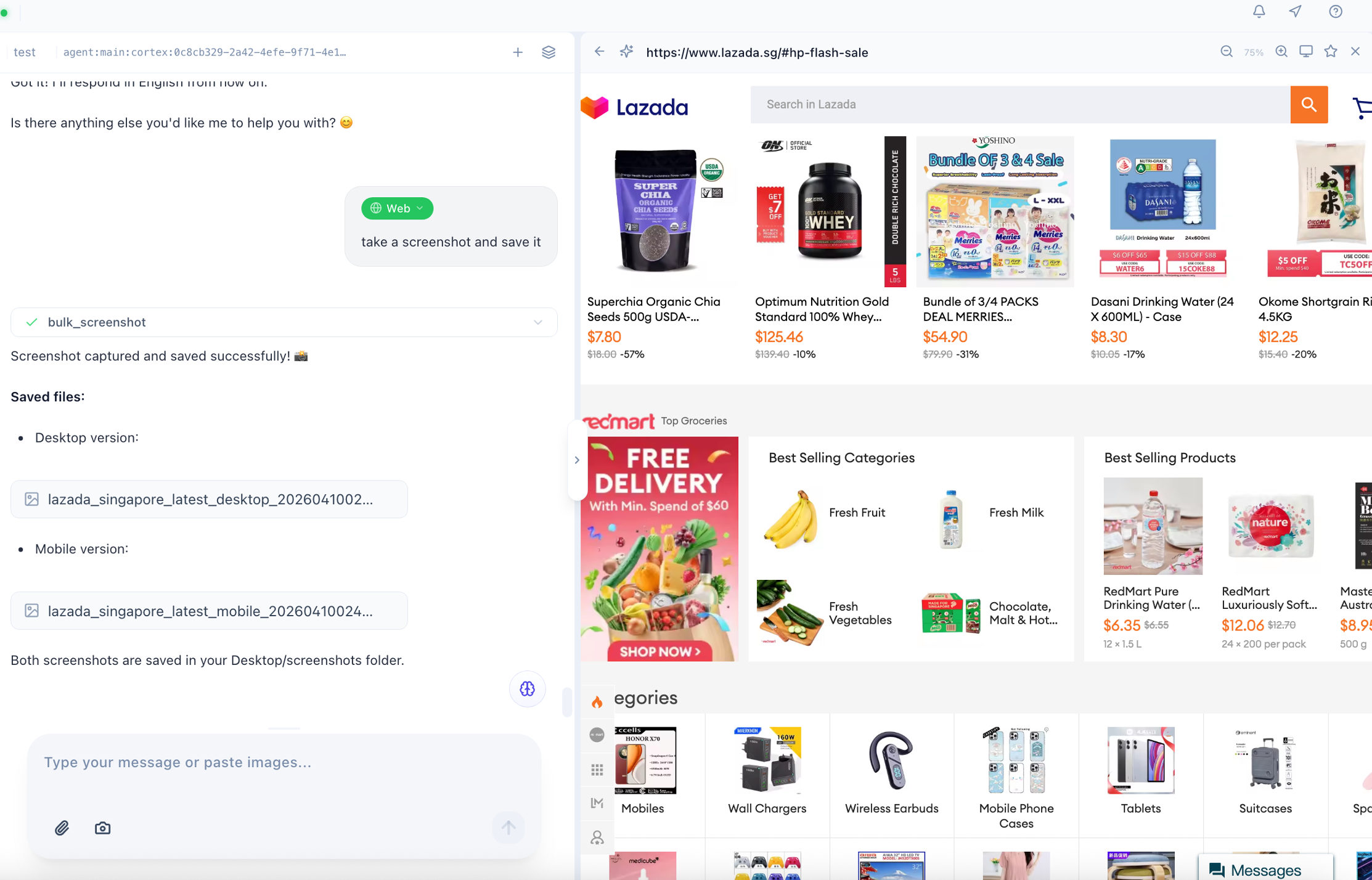
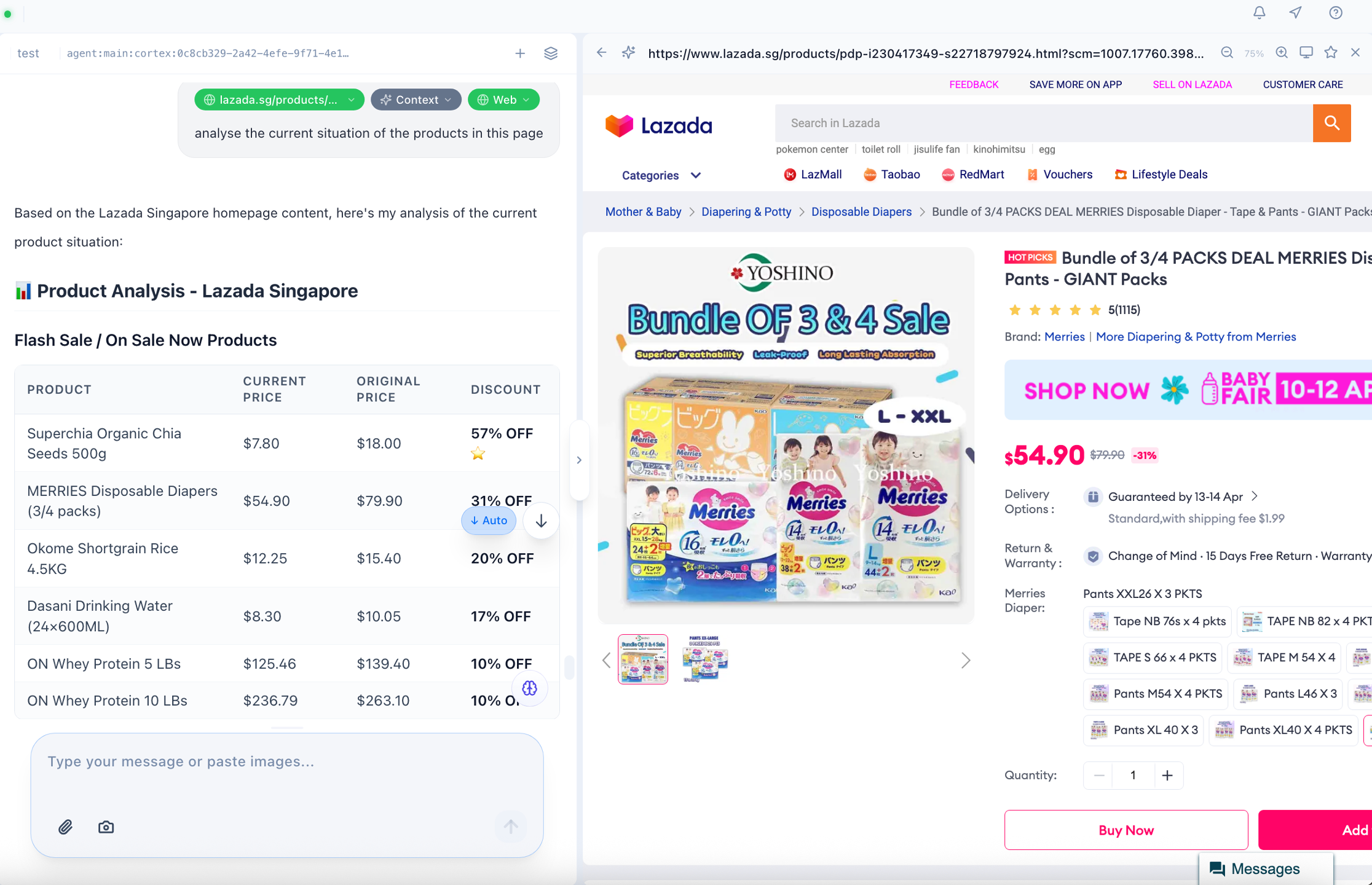
The two example images clearly show the complete flow of this feature:
- Command-Driven Web Screenshot Capture — Users simply provide a target URL (e.g., a NetEase Yanxuan product page or Taobao product review page) and send a command. The system automatically captures the screenshot, supporting both desktop and mobile size adaptation, generating multiple screenshot files in one click.
- Automated Screenshot Management & Storage — After capture, screenshots are automatically saved to the specified path and presented in a structured table showing page name and device adaptation status, making it easy to view and manage.
- AI-Powered Content Analysis from Screenshots — For web content in the screenshots (e.g., product information, user reviews, store data), the system automatically performs structured parsing, extracts key information, and generates business insights — no manual data organization required.
Core Capability Modules
1. Multi-Device Web Screenshot Capture
- Fully Automated Screenshot Execution: After the user inputs a URL and command, the system automatically simulates browser access to the target page and captures the screenshot without manual operation. Supports e-commerce detail pages, review pages, product listing pages, and more.
- Multi-Size Adaptive Capture: Simultaneously supports desktop (1920×1080) and mobile (390×844) screenshot sizes to meet different page display and analysis needs, adapting to PC and mobile page style differences.
- Batch Screenshots & Unified Storage: Supports capturing multiple web pages simultaneously. All screenshots are automatically saved to the specified directory (e.g.,
/Users/alex/Desktop/screenshots/in the example) with a clear result report for batch management. - Standardized Format Output: Screenshots are saved uniformly in JPEG format for broad compatibility — ready for direct use in reports, analysis, or sharing.
2. Structured Content Parsing from Screenshots
Using the Taobao product review page analysis as an example, the system can precisely extract and structurally present information from screenshots:
- Basic Information Overview: Automatically identifies store name, product sales volume, review count, price, and other key metrics to quickly generate a product data dashboard.
- Structured User Review Extraction: Parses user review content item by item, extracting core information such as purchased specifications, fabric feedback, styling suggestions, and size feedback — transforming unstructured user reviews into analyzable structured data.
- Key Information Highlighting: Automatically identifies high-frequency feedback points in reviews (e.g., "comfortable fabric," "stretchy," "slim fit"), extracting the product's core strengths and user focus areas.
3. Business Insights & Analysis Output
- Product Information Interpretation: Combines product details, pricing, and sales data from screenshots to quickly analyze market performance and user feedback, providing data support for e-commerce operations and competitive research.
- User Review Analysis: Extracts common feedback from user reviews, identifying users' core concerns, positive highlights, and potential improvement areas to support product optimization and operational decisions.
- Result Reuse & Extension: Analysis results can be directly used for subsequent report generation, data comparison, or multi-turn follow-up questions, and can be exported as structured documents for information retention and reuse.
Typical Use Cases
- E-commerce Competitive Research: One-click capture of competitor product detail and review page screenshots; automatically analyze product selling points, user feedback, and sales data for quick competitive comparison.
- Product Operations Review: Capture screenshots of your own store's product pages, analyze user reviews and product data, extract user feedback, and support product optimization and operational strategy adjustments.
- Market Information Collection: Batch screenshot and analyze e-commerce platforms, official websites, and other web pages to quickly gather market information, product updates, and user feedback for market research and decision-making.
- Web Content Archiving: Screenshot and structurally parse important web pages for long-term archiving and searchability, preventing information loss due to page expiration.
Core Value Summary
SingWork's web screenshot and content analysis essentially provides users with an "automated web information capture and analysis assistant." It solves the pain points of traditional web information gathering — tedious manual screenshots, time-consuming data organization, and high barriers to content interpretation — achieving full-flow automation from web capture to data interpretation, enabling users to efficiently extract key information and business insights from web pages, and dramatically improving efficiency in e-commerce research and competitive analysis scenarios.