
File Search
Intelligent file recognition and search is one of SingWork's core capabilities for multi-file scenarios. It allows users to upload multiple files and then quickly locate target files, parse file structures, and identify field information through natural language commands — solving the pain points of "too many files, hard to locate, hard to understand" in multi-file management. It is the user's "intelligent file manager."
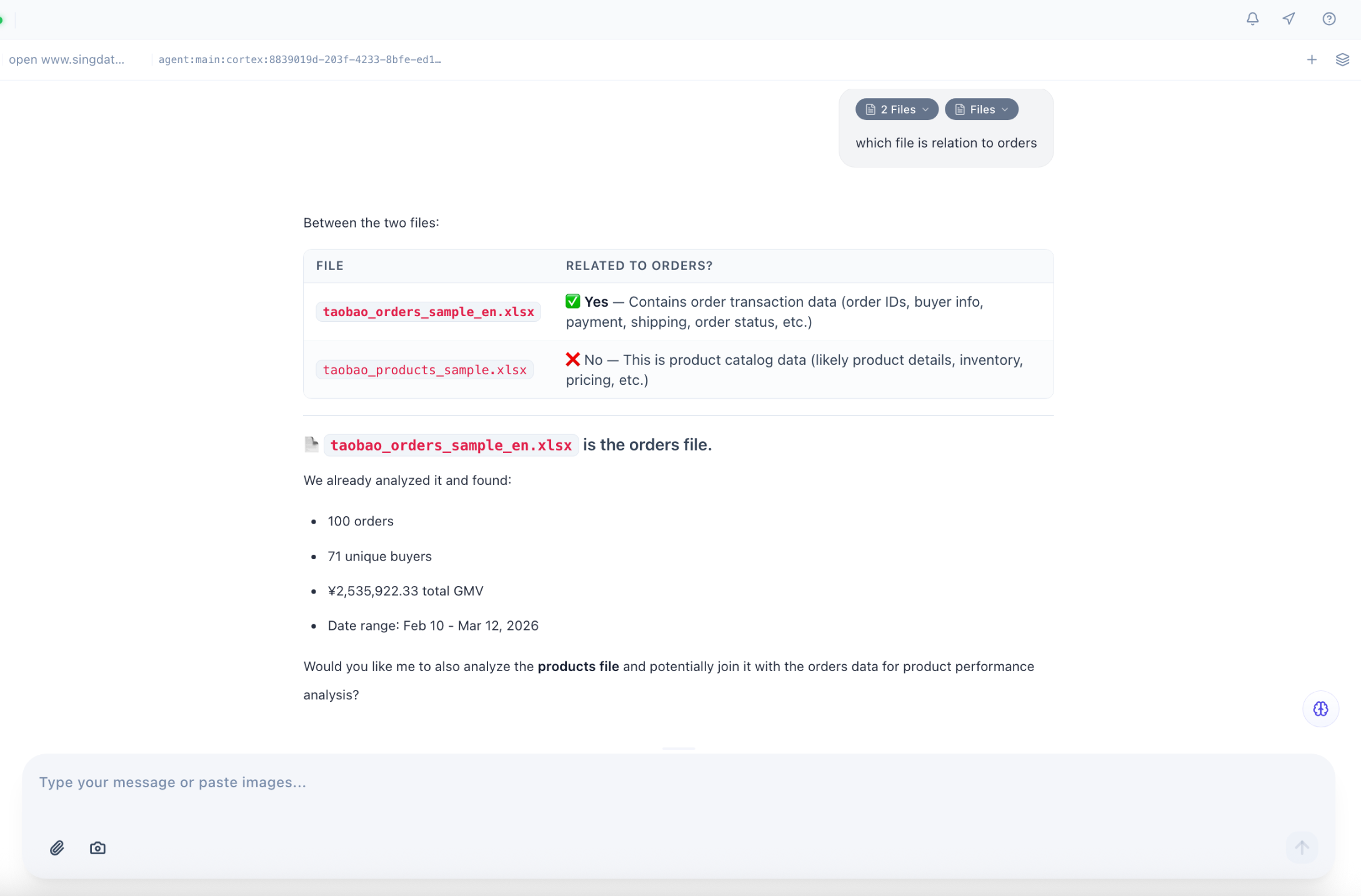
Core Functionality Flow & Experience
The example scenario clearly shows the full flow of this feature:
- Batch File Ingestion — Users can upload multiple related files at once (e.g., Taobao order-related files). All files are managed in SingWork's workspace without manual sorting or categorization.
- Natural Language File Location — Users simply ask in natural language (e.g., "which file is related to orders?"), and the system automatically scans all uploaded files to quickly match and locate the target — no need to manually open and check each one.
- Automatic File Structure Parsing — After locating the target file, the system automatically parses its core information, including file path, contained fields, and field meanings, presented in a structured format so users can quickly understand the content without opening the file.
Core Capability Details
1. Multi-File Intelligent Matching & Location
- Semantic File Search: Supports finding files by business semantics rather than file names — even with non-standard naming, the system can automatically match relevant files based on business keywords in the user's query (e.g., "orders," "users," "products").
- Multi-File Batch Filtering: Supports managing multiple files simultaneously and quickly filtering those relevant to the user's needs — especially useful for scenarios with multiple related data files (e.g., orders, users, products, traffic tables).
- File Source Traceability: Clearly marks the path and source of target files for easy subsequent access and use.
2. Automatic File Structure Parsing & Field Recognition
Using the order file parsing example, the system can automatically identify and annotate core field information:
| Field Category | Example Fields | Parsing Description |
|---|---|---|
| Order Identifier | order_id | Identified as "Order Number" with clear field meaning |
| User Information | buyer_nickname / buyer_id | Identified as "Buyer Information" with related fields grouped |
| Product Information | product_name | Identified as "Product Name" with field purpose annotated |
| Transaction Data | price / quantity / actual_payment | Identified as "Price, Quantity, Actual Payment" with business meaning explained |
| Time Nodes | order_time / payment_time / shipping_time | Identified as "Order/Payment/Shipping Time" with time fields grouped |
| Status Information | logistics_status / order_status | Identified as "Logistics/Order Status" with status fields annotated |
Results are presented as a structured list, allowing users to quickly understand the file's business purpose and data structure without opening it — significantly reducing file comprehension costs.
3. Context Memory & Multi-Turn Interaction
- Session-Based File Memory: Powered by the
SingMemorymodule, the system remembers all files uploaded in the current session. Users can issue search commands directly without re-uploading or re-explaining file information. - Multi-Turn File Interaction: Supports follow-up questions based on search results, e.g., "what order status fields are in this file?" or "show me another file related to users" — the system continuously responds to multi-turn file-related commands.
Typical Use Cases
- Multi-File Data Processing: When working with multiple data files (orders, users, products, etc.) simultaneously, quickly locate target files to avoid manual searching through large file sets and improve analysis efficiency.
- Quick Understanding of Unfamiliar Files: When receiving unfamiliar files (e.g., historical data files, third-party exports), quickly parse the file structure and field meanings to reduce comprehension costs.
- Pre-Analysis for Cross-File Joins: Before performing multi-file join analysis, use this feature to confirm each file's fields and purpose, clarify analysis logic, and avoid errors caused by unclear file structures.
- File Management & Archiving: Semantically manage large numbers of files — find target files quickly through natural language, replacing traditional folder categorization and manual search.
Core Value Summary
SingWork's intelligent file recognition and search essentially provides users with a "semantic intelligent file manager." It solves the pain points of traditional file management — reliance on file names, low search efficiency, and difficulty understanding unfamiliar files — enabling users to quickly locate files and parse structures through natural language, laying the foundation for subsequent data analysis and business processing, and dramatically improving efficiency in multi-file scenarios.