
File Analysis
File analysis is one of SingWork's core capabilities. It allows users to directly upload local or cloud data files (such as Excel/CSV), and with a single natural language command, complete data parsing, cleaning, visualization, and structured report generation. It enables non-technical users to perform professional-grade data analysis with ease — the "AI data analyst" for data processing scenarios.
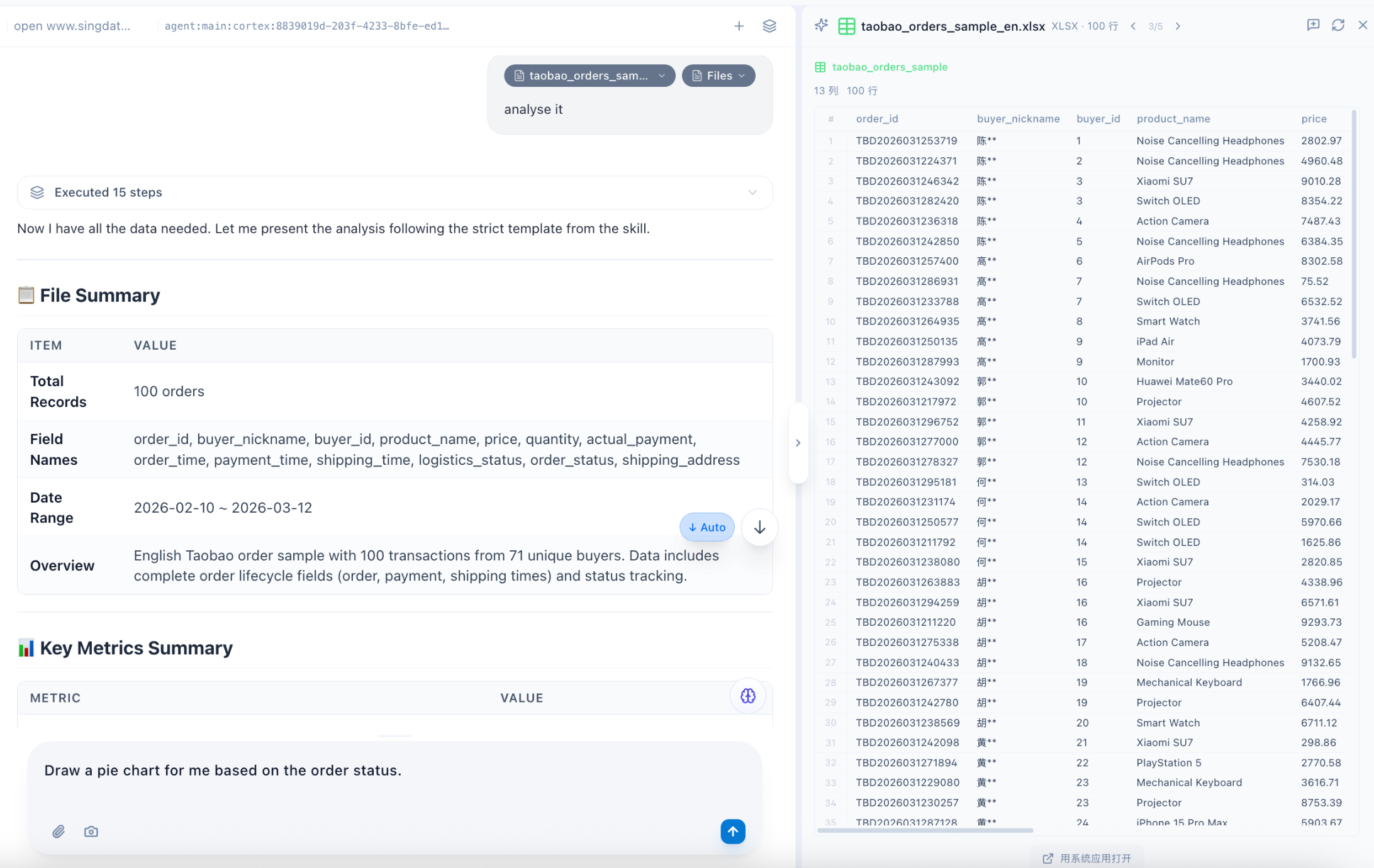
Core Functionality Flow & Experience
The example scenario clearly shows how lightweight SingWork's full data file analysis flow is:
- One-Click File Ingestion — The left-side file manager supports direct import of local data files (e.g.,
taobao_orders_sample_en.xlsx). Supports Excel, CSV, and other mainstream data formats — no database connection or platform upload required. - Natural Language Command-Driven Analysis — Users simply enter a command (e.g., "analyze this file") to trigger the automated analysis flow — no SQL, Python code, or manual task configuration needed.
- Automated Execution with Progress Feedback — The system automatically handles data loading, parsing, cleaning, and analysis in the background, providing real-time progress feedback (e.g., "executed 41 operations"). Users can view intermediate results without waiting.
- Visualization Report with Raw Data Reference — The right panel simultaneously displays a raw data preview (table format) while the center generates a structured visualization report, enabling side-by-side comparison of "raw data vs. analysis results" to reduce comprehension costs.
Core Capability Modules
1. Intelligent Data Parsing & Structured Processing
- Multi-Format Compatibility: Supports Excel, CSV, and other mainstream data files; automatically identifies table fields, data types, and row/column structure — no manual header or format setup required.
- Data Validation & Cleaning: Automatically handles deduplication, null value processing, and outlier detection, providing a clean and reliable data source for downstream analysis.
- Field-Level Recognition: Precisely parses business fields such as order IDs, buyer information, product names, prices, and sales volumes — automatically adapting to common e-commerce and retail data analysis logic.
2. One-Click Business-Level Visualization Reports
Using the Taobao order data example, the system automatically generates an analysis report with core business metrics:
| Metric | Example Result | Analytical Value |
|---|---|---|
| Orders / Total GMV / Avg. Order Value | 100 / 2,535,922.33 / 35,717.22 | Quickly grasp overall sales scale and user spending power |
| Paying Users / Payment Conversion Rate | 71 / 91.00% | Evaluate user conversion efficiency and identify bottlenecks |
| Refund Orders | 20 | Identify after-sales risks to support supply chain and service optimization |
Reports are presented in a card-style visualization with core metrics, and support further drill-down into sub-dimensions (e.g., product sales rankings, user spending distribution, time trends) — no additional chart configuration needed.
3. Deep Analysis via Natural Language Interaction
- Metric Drill-Down & Segmentation: Users can ask follow-up questions (e.g., "break down sales by product category," "analyze high-value customer characteristics"), and the system automatically performs multi-dimensional drill-down analysis based on the raw data.
- Anomaly Interpretation: Automatically identifies anomalies in the data (e.g., sudden order drops, avg. order value deviations) and provides possible business explanations in natural language.
- Custom Analysis Tasks: Supports user-initiated specific analyses (e.g., RFM user segmentation, repurchase rate calculation, sales forecasting) without manually configuring complex analytical models.
4. Integrated File Management & Collaboration
- File Directory Management: The left-side file manager supports managing multiple files simultaneously (e.g., orders, users, products, traffic data files), with quick switching between data sources for joint analysis.
- Export & Sharing: Supports exporting generated reports and charts to common formats, or sharing directly within SingWork with team members for rapid result distribution.
- Session Memory & Context Understanding: Based on the
SingMemorymodule, supports multi-turn conversational analysis without re-uploading files or re-explaining analysis needs.
Typical Use Cases
- E-commerce & Retail Data Analysis: Quickly analyze order, user, and product data; auto-generate sales performance reports, user segmentation analysis, and product activity analysis to support operational decisions.
- Internal Business Report Generation: Finance, HR, and sales teams can generate structured reports from daily data files with a single natural language command, replacing manual spreadsheet work.
- Data Research & Competitive Analysis: Quickly parse external public or survey data, extract key metrics, and generate comparative analysis reports to improve research efficiency.
- Data Onboarding & Exploration: Non-technical users can quickly understand data meaning and business value through natural language interaction, lowering the barrier to data analysis.
Core Value Summary
SingWork's file analysis capability essentially provides users with a "zero-code, natural language-driven, all-in-one data analysis platform." It solves the pain points of traditional data analysis — high technical barriers, complex workflows, and dependence on specialists — enabling business users, operations teams, and managers to quickly extract business insights from data with simple commands, dramatically improving the efficiency and accessibility of data-driven decision-making.