
SingWork Product Introduction
SingWork Positioning
Hi, I'm SingWork — your AI data partner. Not just a tool, but a companion: a top-tier analyst living right on your computer.
- SingWork is an AI-powered desktop analytics agent built for growing businesses and power users. It's not a Q&A tool — it's an Agent Partner that remembers, analyzes, and acts.
- A partner that truly remembers you — capable of managing files based on contextual memory, integrating and analyzing data, automating and accelerating data pipeline construction, and delivering data insights as your "AI Data Assistant."
- Built around the core philosophy of "turning data viewing into action," SingWork helps you move from scattered data to real decisions through proactive insights, natural language interaction, and continuous learning — leaving behind report piles and repetitive analysis.
SingWork Core Capabilities
SingWork is the AI analytics brain built for growing businesses, with the following core capabilities:
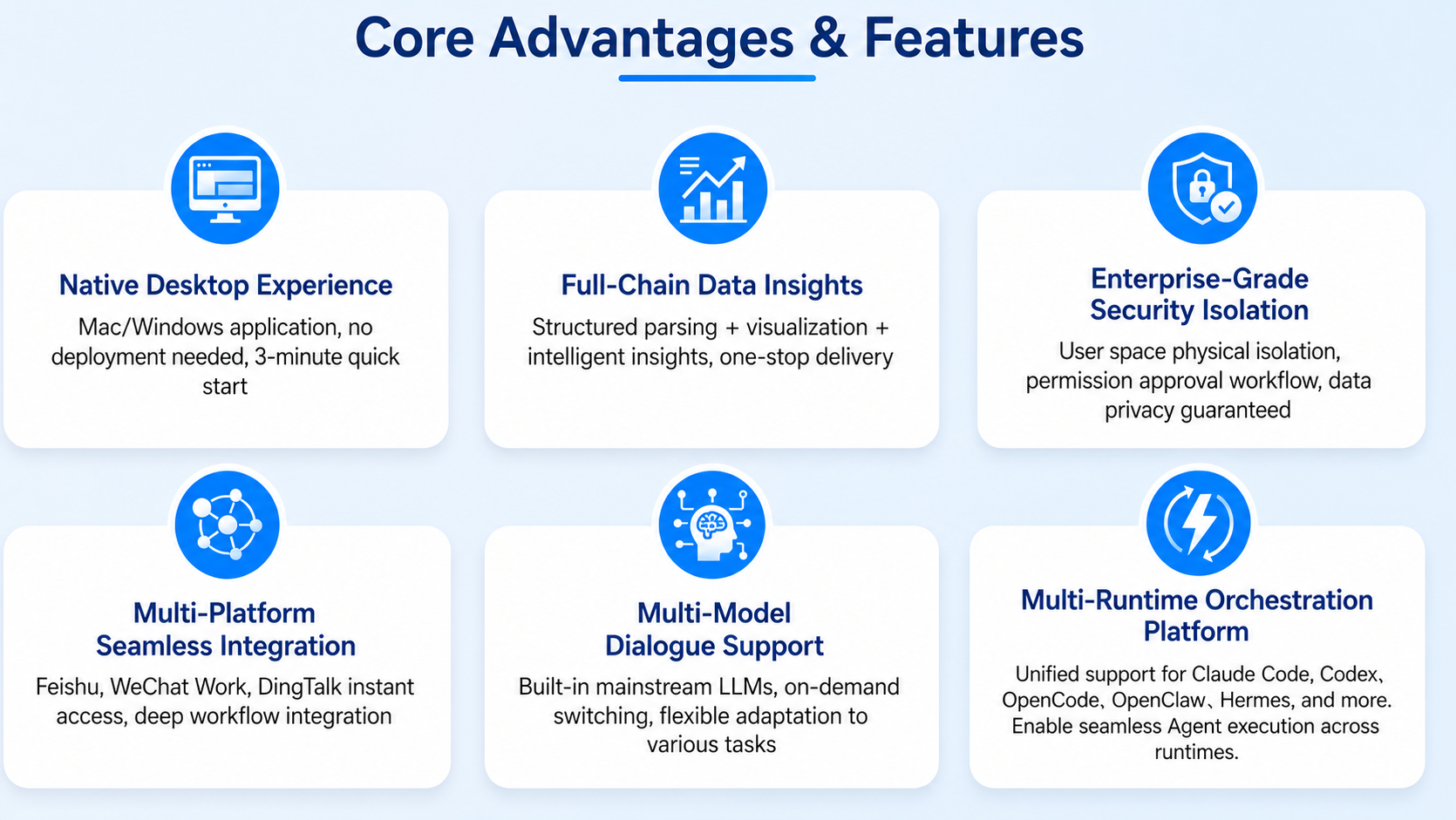
🖥️ Native Desktop Experience
A local Mac/Windows application — no complex deployment, ready in 3 minutes. Data is processed locally, eliminating cloud dependency for faster responses and a smoother experience.
📊 Full-Chain Data Insights
An all-in-one platform for structured parsing + visualization + intelligent insights. From descriptive analysis (what happened) and diagnostic analysis (why it happened), to predictive analysis (what will happen) and prescriptive analysis (what should be done) — a four-layer closed-loop that makes data value immediately clear. Paired with SingMemory, your business context, historical decisions, and key focus areas are intelligently retained, so every analysis builds on complete context.
🔒 Enterprise-Grade Security Isolation
Physical isolation of user spaces, permission approval workflows, and sensitive data processed entirely on-device without uploading to third-party servers — ensuring data privacy, security, and compliance.
🔗 Seamless Multi-Platform Integration
Native integration with Feishu, WeCom, e-commerce platforms, HR systems, and more. Deep workflow fusion with automatic cross-platform data aggregation eliminates multi-system switching and dramatically improves collaboration efficiency.
🤖 Multi-Model Conversation Support
Built-in support for mainstream large language models with on-demand switching to match different task complexities. Ask questions in natural language to drill down, compare, and follow up on data — no SQL or complex BI configuration needed. Business users can get started immediately with "conversation as analysis."
⚡ Multi-Runtime Orchestration Platform
Unified scheduling: Claude Code, Codex, OpenCode, OpenClaw, Hermes and other various Runtimes are unified. The interface differences of different runtimes are shielded, enabling Agents of different Runtimes to be coordinated and orchestrated on the same interface.
SingWork Feature Highlights
SingWork is built around the core logic of "understand business context → complete intelligent analysis → output actionable recommendations → accumulate reusable experience," creating a data-driven decision loop that transforms "receiving a report" into "directly analyzing and deciding."
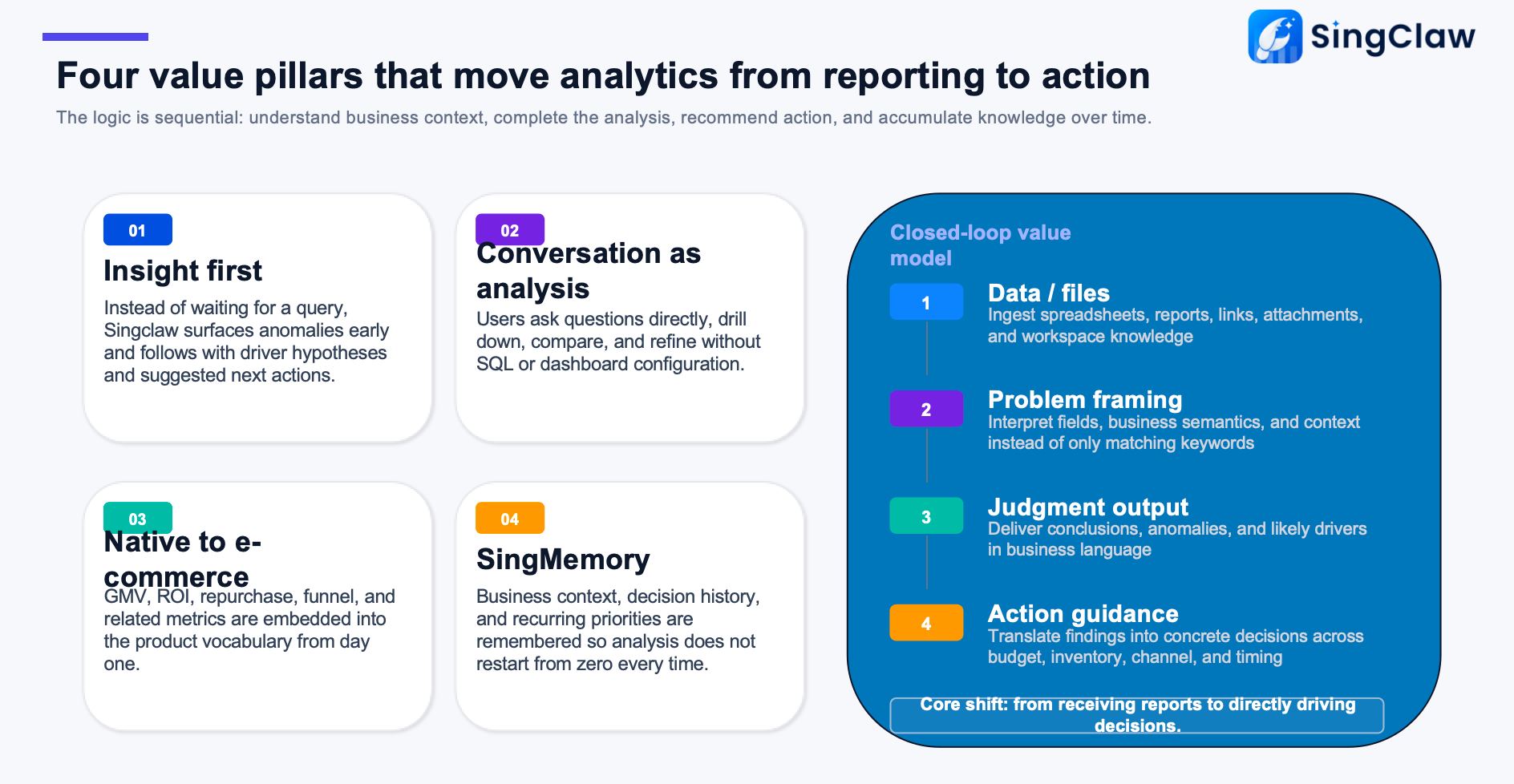
🔍 01 Insight First
Proactively detects anomalies without waiting for user queries, while providing root cause analysis and next-step recommendations. No more manually pulling reports — the system automatically captures data anomalies, pinpoints root causes, and suggests solutions, helping you catch critical business changes first.
💬 02 Conversation as Analysis
Users can drill down, compare, and follow up simply by asking questions — reducing the barrier of SQL and BI configuration. Just ask in natural language to complete data drill-downs, multi-dimensional comparisons, and continuous follow-ups. No technical background required; business users can perform deep analysis with zero friction.
🛒 03 E-commerce Native
Built-in core skills for GMV, ROI, repurchase rates, funnels, and more — closely aligned with growth-oriented business analysis. Designed for e-commerce and retail growth businesses, with industry-standard metrics and analysis logic built in. No extra configuration needed to quickly complete sales monitoring, campaign reviews, user segmentation, and product optimization.
🧠 04 SingMemory Retention
Continuously remembers business context, historical decisions, and key focus areas — so analysis never starts from scratch. The system remembers your business habits, past analysis conclusions, and long-term priorities. The more you use it, the better it understands your business, delivering insights and recommendations grounded in past experience.
Value Loop Process
SingWork delivers a full-chain experience from data ingestion to execution:
- Data / File Ingestion: Drag local files, connect group chat data or system data sources — one-click data preparation
- Problem Understanding: Automatically identifies field meanings, business semantics, and context — not just surface-level Q&A
- Conclusion Generation: Directly outputs key conclusions, anomalies, and reasons for changes — eliminating manual interpretation
- Actionable Recommendations: Translates into executable actions around budget, inventory, channels, and timing — truly converting data into business levers
Typical Use Cases
- E-commerce Operations: Real-time sales monitoring, campaign reviews, user behavior analysis, product structure optimization, and conversion improvement
- Personal / Small Business: All-channel revenue aggregation, customer profit analysis, intelligent business priority recommendations
- HR & Recruiting: Intelligent resume screening, precise job-candidate matching, automatic candidate highlight extraction and comparison
- General Metric Monitoring: Historical trend tracking, YoY/MoM analysis, core metric dashboards, automatic anomaly alerts